**Run:** Quick-open (Cmd/Ctrl-O) and search for "Open Tag Manager", or type { in any note and choose "Open Tag Manager".
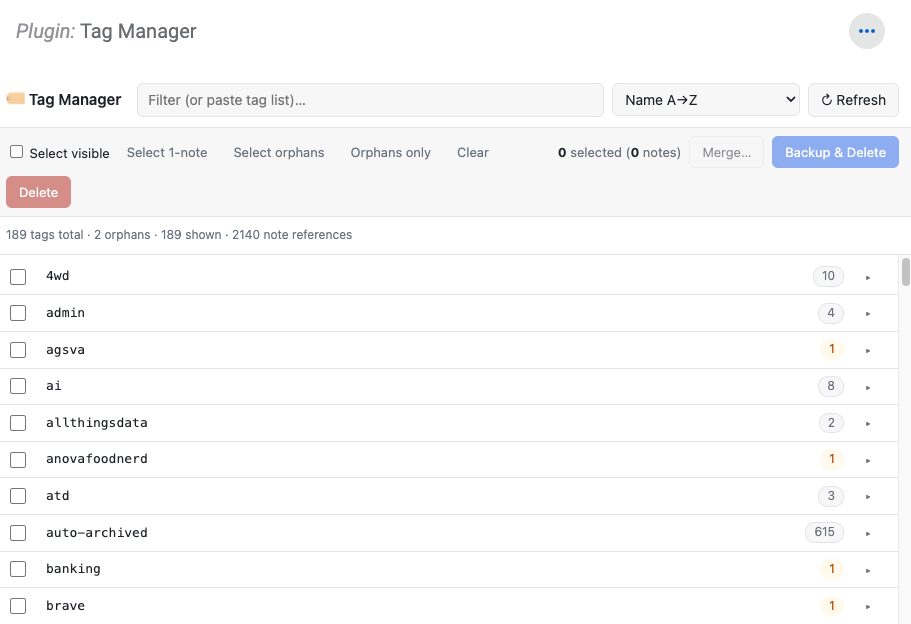
**Triage:** Sort by name (default) or count. Click any tag to expand and see its notes with last-updated date. Paste a comma-separated list — or copy a tag-header row from Amplenote and paste it directly; more_horiz separators are stripped automatically.
**Curate:** Click anywhere on a row to select. Quick-select "1-note tags" or "orphan tags" buttons for bulk selection. Toggle "Orphans only" to see tags that exist in the registry but apply to zero notes.
**Modify:** Selected tags can be deleted (every note loses the tag) or merged into a single target (existing or brand new). Every destructive action offers a backup-first option that writes a markdown note tagged tag-manager/backup listing every affected tag and note for rollback.
**Safety:** Notes themselves are never touched — only tag metadata. Registry-side cleanup is verified via getTags() after each operation; if any tags refuse to fully evict (shared notebooks, hierarchical parents), they're reported by name in the result toast.